First Struts Tutorial (free tools, Struts Console, JBoss IDE)
This tutorial will explain first steps using the web framework Apache Struts and the development environment eclipse. We will create a simple example library application using free plugins like the Struts Console and the JBOSS IDE.
General
Autor:
Sebastian Hennebrüder
Sascha Wolski
http://www.laliluna.de/tutorials.htmlDatum:
January, 20th 2005
Development
Tools
Eclipse 3.x
Struts Console
JBOSS IDE (when using JBOSS)
Sysdeo Plugin (when using Tomcat)
Source code:
http://www.laliluna.de/download/first_steps_with_struts.zip
Using the source code.
The source code does not include any libraries but the sources. Create a web project, add the libraries manually as explained in the tutorial. Then extract the sources, we provided, to your project.
The PDF Version of the tutorial.
http://www.laliluna.de/download/first-steps-with-struts-free-tools-en.pdf
Inhaltsverzeichnis
First steps tutorial using struts and eclipse 1
Allgemeines 1
Requirements 1
Installation of the Struts Console 2
Create a Web Project 2
Adding Struts Support 2
Create a default welcome page 4
Global Action Forwards and Action Mappings 5
Usecase Book List 6
Usecase Add, edit and remove the data 15
Changes to the book list JSP 21
Testen der Anwendung 22
Requirements
We require the installation of the JBOSS IDE, when you are using JBOSS as application server. A Tutorial how to create and deploy web projects with the JBOSS IDE can you find here.
http://www.laliluna.de/articles/posts/webprojects-eclipse-jbosside-tutorial-en.html
When you are using Tomcat, you can use the Eclipse Plugin
http://www.sysdeo.com/eclipse/tomcatPlugin.html
as an alternative.
Installation of the Struts Console
Download the sources from the website
http://www.jamesholmes.com/struts/console/
Unzip the file and copy the directory
com.jamesholmes.console.struts
to the path eclipseplugins
Start Eclipse and that's it.
Create a Web Project
The creation of a web project with the JBOSS IDE is explained in the tutorial
http://www.laliluna.de/articles/posts/webprojects-eclipse-jbosside-tutorial-en.html
which was mentioned in the requirements. Explain a web project as explained there.
Adding Struts Support
For now your project is a normal J2EE project, so we need to add the struts capabilities (libraries, xml files, ...). The easiest way is to copy a blanc struts project into your project.
You can download a blanc project here.
http://www.laliluna.de/download/struts-blanc-project-1.2.zip
Unzip the content of the blanc struts project into your project in the eclipse workspace.
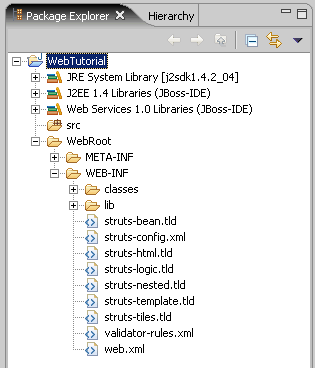
Actualize the project in the package explorer by clicking on the right mouse button -> command ?refresh?.
Your project looks like the following now.
Adding the struts libraries
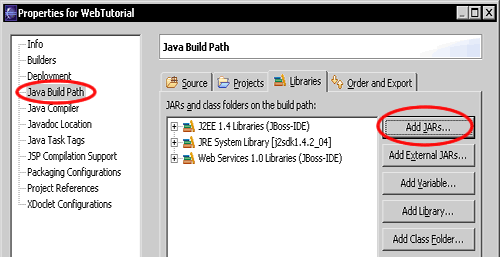
Now you must add the libraries to your classpath. Right click on the project and select ?properties? in the context menu.
Select ?Java Build Path? and ?add jars? in the Libraries tab.
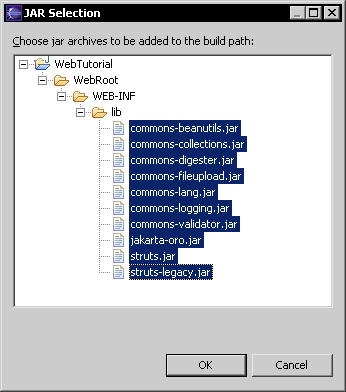
You
will find the JAR files in Projekt > WebRoot > WEB-INF >
lib. Use SHIFT to select
multiple jar files.
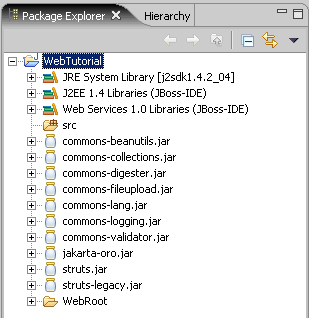
The struts libraries are now listed in the package explorer.
Create a default welcome page
Ok, now we want to create a default page. Right click (yes again) on the Folder WebRoot in the Project and choose New > JSP. If you cannot find this option, select ?other? and then JSP.
You must have installed the JBOSS IDE!
Create a new JSP in the directory WebRoot.
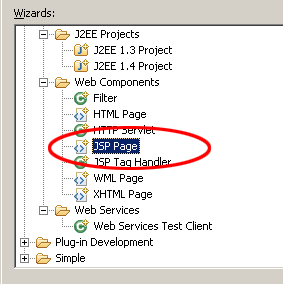
You will find the file index.jsp in the folder WebRoot of the project. We must add the Struts Tag Libraries to our JSP. We need Tag Libraries to use Struts Tags in a JSP. In this case we only need the Struts logic tab library. Change your JSP content to the following.
<%@page contentType="text/html" %>
<%@ page language="java"%>

<%@ taglib uri="http://jakarta.apache.org/struts/tags-logic" prefix="logic" %>


<logic:forward name="welcome"/>
The logic:forward tag makes Struts look for a forward in the configuration files. When it cannot find this forward an Exception will occure. We explain Action Forwards in the next chapter.
Create
a second JSP index.jsp
in the directory /WebRoot/jsp.
Change the JSP to the following:
<%@ page language="java"%>

<%@ taglib uri="http://jakarta.apache.org/struts/tags-html" prefix="html" %>

<!DOCTYPE HTML PUBLIC "-//W3C//DTD HTML 4.01 Transitional//EN">
<html:html locale="true">
  <head>
    <html:base />

    <title>index.jsp</title>

    <meta http-equiv="pragma" content="no-cache">
    <meta http-equiv="cache-control" content="no-cache">
    <meta http-equiv="expires" content="0">
    <meta http-equiv="keywords" content="keyword1,keyword2,keyword3">
    <meta http-equiv="description" content="This is my page">
  </head>

  <body>
    Welcome!
    <br>
    <html:link action="bookList">Show the booklist</html:link>
  </body>
</html:html>
Global Action Forwards and Action Mappings
What
is an action forward?
A
action forward can be used to forward to a jsp or action mapping.
There are two different action forwards. The global action forward
and the local action forward. You can access a global action forward
on each jsp or action class. A local action forward can only be
accessed by the assigned action class.
What
is a action mapping?
The
action mapping is the heart of struts. It managed all actions between
the application and the user. You can define which action will be
executed by creating a action mapping.
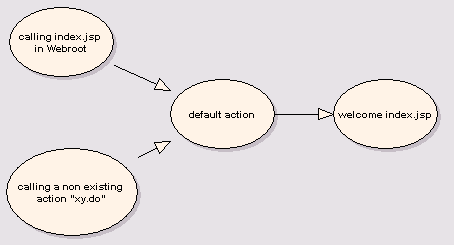
The diagram show you, how the application server manage the request of the index.jsp or a non existing action mapping.
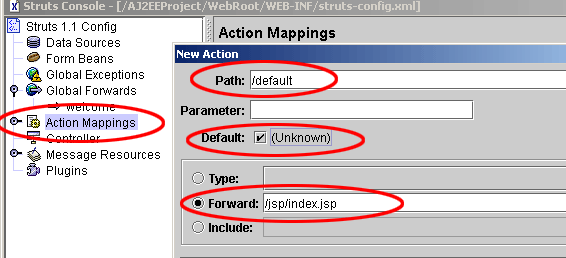
In the first step we create a new action mapping. Open the struts configuration file struts-config.xml, which is located in WebRoot/WEB-INF. The Struts Console is opened. (If not, right click on the struts-config.xml and select ?open with?.
Click on Action Mappings and select Add.
Input /default as path and select the Action Type Forward. As Forward Path we will use our welcome page /jsp/default.jsp
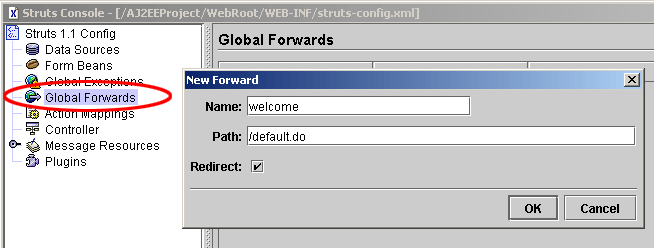
In the next step we will create the Global Action Forward. Click on ?Global Forwards?, select ?add?.
Choose /default.do as path, wich is the action we specified above.
Usecase Book List
A Struts Action does always some kind of business logic and saves the result in a class of type ActionForm. The data from the ActionForm can be displayed in a JSP.
Our Action will read data from the database, save it in the action form. The JSP will display our data.
Create a object class ?book?
Create a new class Book in the package de.laliluna.tutorial.library.
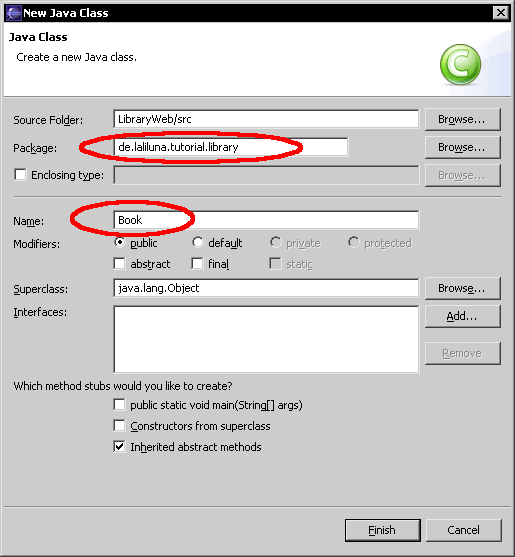
The Class Book
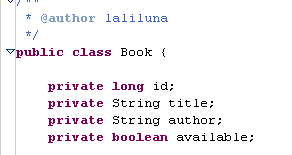
represents a book with the properties id, author, title and
available.
Create four variables.
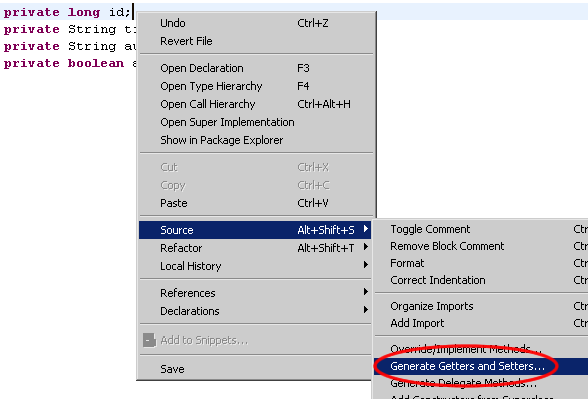
Create a getter and setter for each variable. Right click in your class, Source > Generate Getters and Setters
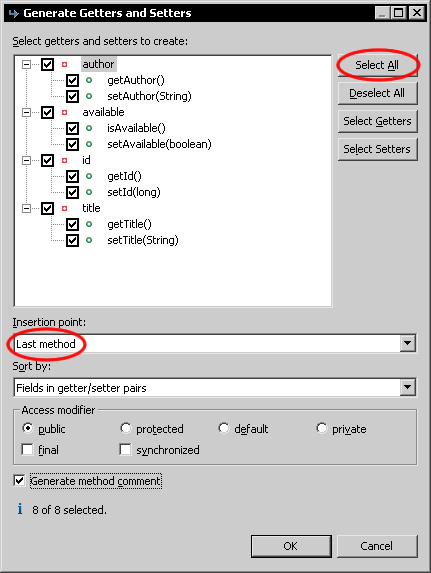
Choose Select All and insertion point Last method.
Add two constructors to the class to set the properties on initialisation of the class.
// Contructor
public Book(){}

//  Contructor to initial the properties
public Book(long id, String author, String title, boolean available) {
	this.id = id;
      this.author = author;
      this.title = title;
      this.available = available;
}
Thats all for our book class!
Create a form bean, action form and jsp
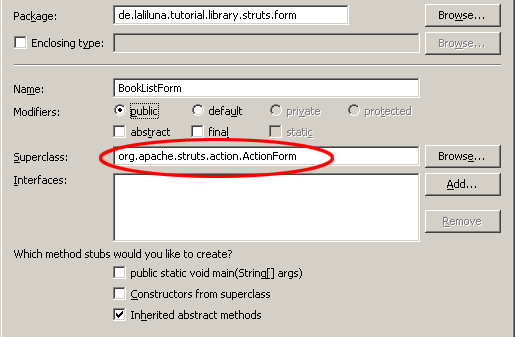
Create a new sub
class of ActionForm. The ActionForm will hold our books to display
them in the JSP.
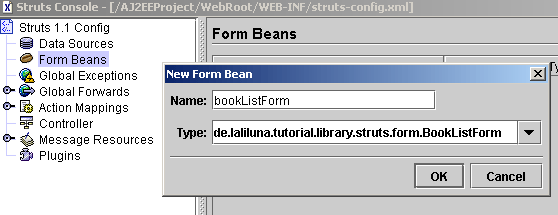
Open the struts-config.xml and add a new form bean with the struts console. The type is our just created class.
Change the source code of the action form class.
Open the file BookListForm.java and change the source code:
public class BookListForm extends ActionForm {

 	private Collection books;

	/* lalinuna.de 02.11.2004
 	* get the collection books
 	*/
 	public Collection getBooks() {
 		return books;
 	}

 	/* lalinuna.de 02.11.2004
 	* set the collection books
 	*/
 	public void setBooks(Collection books) {
 		this.books = books;
 	}

	/* lalinuna.de 02.11.2004
 	* reset the collection books
 	*/
 	public void reset(ActionMapping arg0, HttpServletRequest arg1) {
		books = new ArrayList();
 	}
}
In our class we have defined a collection books and the access methods (getters and setters).The method reset is called by struts each time a form is initialized. When your scope is request, this is at each request.
Create an action mapping and an action class.
Create a class BookListAction. This class loads the books from the database and saves it in the BookListForm.
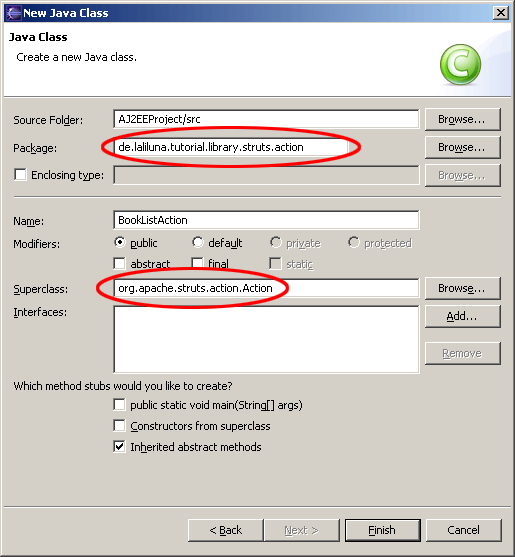
Change the source code of the action class.
Open the class bookListAction
and implement the methode execute
from the super class ActionForm.
The following call
mapping.findForward("showList")
looks for a forward with the
name ?showList? in the action mapping declaration and forwards to
it.
/**
 * Method execute
 * @param mapping
 * @param form
 * @param request
 * @param response
 * @return ActionForward
 */
 public ActionForward execute(
	ActionMapping mapping,
	ActionForm form,
	HttpServletRequest request,
	HttpServletResponse response) {
	BookListForm bookListForm = (BookListForm) form;


   /* lalinuna.de 03.11.2004
    * init SimulateDB class and set some dummy data
    */
    SimulateDB simulateDB = new SimulateDB();
    bookListForm.setBooks(simulateDB.getAllBooks(request.getSession()));


    return mapping.findForward("showList");
 }
Database simulation class
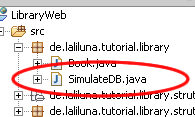
We will not use a real database in this tutorial but a database simulation. Copy the file SimulateDB.java from the source code which we provided as a download above to the package de.laliluna.tutorial.library.
Struts configuration for the book list
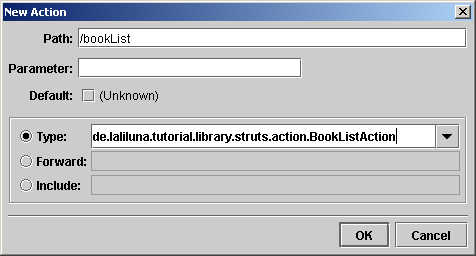
Create a new action mapping with the Struts Console. The path must begin with a slash, the typoe is the action we have just created.
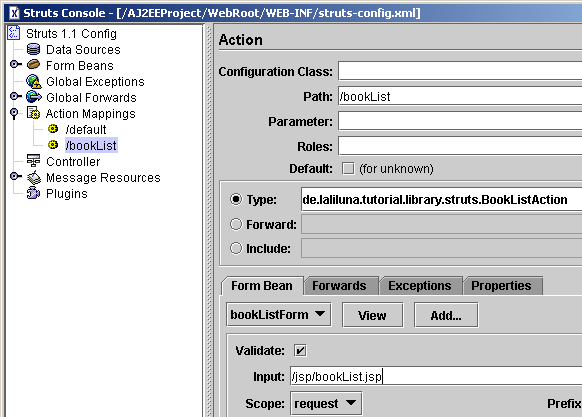
Click on the Action Mapping in the Struts console to access the advanced settings.
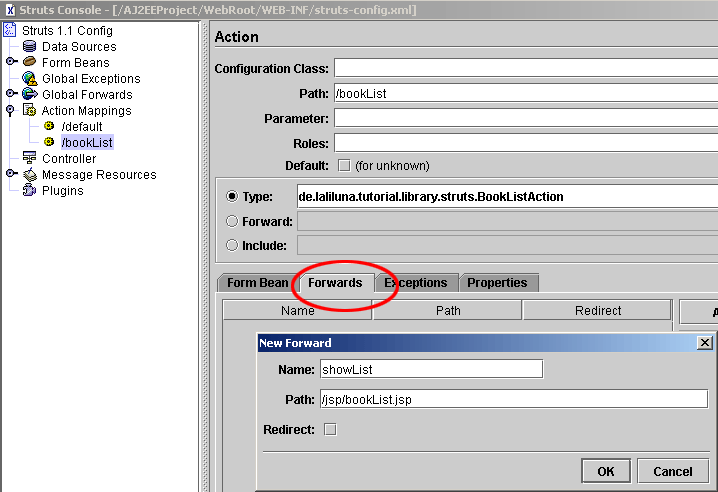
Create a Forward for the Action Mapping of the JSP with the name showList
Create the book list JSP
Create a new JSP in the directory /jsp/ , name it bookList.jsp .
<%@ page language="java"%>
<%@ taglib uri="http://jakarta.apache.org/struts/tags-bean" prefix="bean"%>
<%@ taglib uri="http://jakarta.apache.org/struts/tags-html" prefix="html"%>
<%@ taglib uri="http://jakarta.apache.org/struts/tags-logic" prefix="logic"%>
<html>
<head>
<title>Show book list</title>
</head>
<body>
<table border="1">
<tbody>
<%-- set the header --%>
<tr>
<td>Author</td>
<td>Book name</td>
<td>Available</td>
<td> </td>
<td> </td>
</tr>
<%-- check if book exists and display message or iterate over books --%>
<logic:empty name="bookListForm" property="books">
<tr>
<td colspan="5">No books available</td>
</tr>
</logic:empty>
<logic:notEmpty name="bookListForm" property="books">
<logic:iterate name="bookListForm" property="books" id="book">
<tr>
<%-- print out the book informations --%>
<td><bean:write name="book" property="author" /></td>
<td><bean:write name="book" property="title" /></td>
<td><html:checkbox disabled="true" name="book" property="available" />
</td>
<%-- print out the edit and delete link for each book --%>
<td><html:link action="bookEdit.do?do=editBook" paramName="book"
paramProperty="id" paramId="id">Edit</html:link></td>
<td><html:link action="bookEdit.do?do=deleteBook" paramName="book"
paramProperty="id" paramId="id">Delete</html:link></td>
</tr>
</logic:iterate>
</logic:notEmpty>
<%-- end interate --%>
</tbody>
</table>
</body>
</html>
The tag
<logic:iterate> loops over the collection books
of the form bean bookListForm
Within
the tag <logic:iterate>
you have access to the properties of the book. The tag <bean:write>
prints out a property (author, title) on the current position.
<html:checkbox>
creates a checkbox.
Es ist geschafft puhhhh, wir haben unser Form Bean mit Action Form Klasse, unser Action Mapping mit Action Klasse und unsere JSP, die uns zur Anzeige dient, angelegt.
Very good. We have create an action class which saves the data in an action form. To display the book list we have created a JSP which uses the data in the action form. Easy, isn't it.
If you like you do a first test of your application right here. Have a look at the end of the tutorial, to see how to test.
Usecase Add, edit and remove the data
In the next section we add the functionality to add, edit and remove the data. The process is the same:
-
Action
-
ActionForm
-
Struts Konfiguration
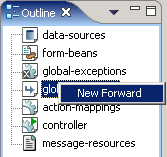
New
form bean
Create a new class as action form in the package de.laliluna.tutorial.library.form . Call it BookEditForm.
Add a new instance of book.
Book book = new Book();
Generate the getters and setters.
Then delegate all methods from the class Book.
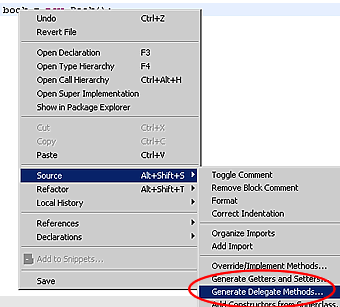
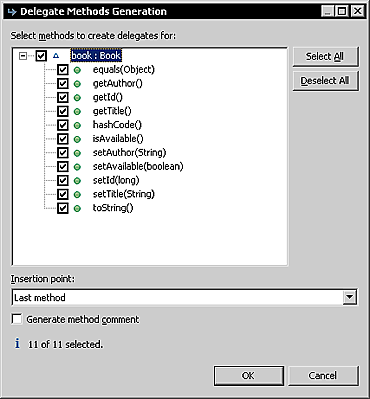
The source code should look like:
public class BookEditForm extends ActionForm {

	Book book = new Book();

	public Book getBook() {
		return book;
	}
	public void setBook(Book book) {
		this.book = book;
	}
	public boolean equals(Object arg0) {
		return book.equals(arg0);
	}
	public String getAuthor() {
		return book.getAuthor();
	}
	public long getId() {
		return book.getId();
	}
	public String getTitle() {
		return book.getTitle();
	}
	public int hashCode() {
		return book.hashCode();
	}
	public boolean isAvailable() {
		return book.isAvailable();
	}
	public void setAuthor(String author) {
		book.setAuthor(author);
	}
	public void setAvailable(boolean available) {
		book.setAvailable(available);
	}
	public void setId(long id) {
		book.setId(id);
	}
	public void setTitle(String title) {
		book.setTitle(title);
	}
	public String toString() {
		return book.toString();
	}
}
Now we can access the attributes of book later in the action form.
Create the action class
Create a new class. This time the class is not a sub class of Action but of org.apache.struts.DispatchAction.
A DispatchAction calls not the execute method but can call different methods depending on a parameter. With the parameter we can decide if the create/edit/delete method is called.
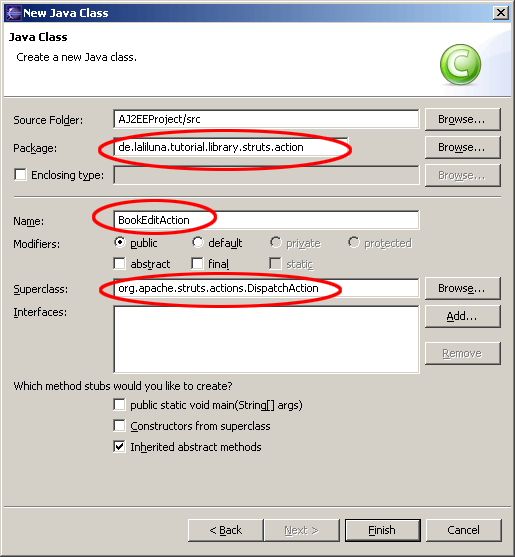
Source code of the DispatchAction class
Open the file bookEditAction.java. Add the methods:
/**
 * Method editBook
 * @param mapping
 * @param form
 * @param request
 * @param response
 * @return ActionForward
 */
public ActionForward editBook(
	ActionMapping mapping,
 	ActionForm form,
 	HttpServletRequest request,
 	HttpServletResponse response) {
 	BookEditForm bookEditForm = (BookEditForm) form;

 	/* lalinuna.de 04.11.2004
 	* get id of the book from request
 	*/
 	long id = Long.parseLong(request.getParameter("id"));

 	/* lalinuna.de 04.11.2004
 	* init SimulateDB class and get book by id
 	*/
 	SimulateDB simulateDB = new SimulateDB();
 	bookEditForm.setBook(simulateDB.loadBookById(id, request.getSession()));

 	return mapping.findForward("showEdit");

}
The method editBook get the parameter id of the request and reads the book by id from the simulated database. The forward showEdit refres to the edit page bookEdit.jsp
/**
 * Method deleteBook
 * @param mapping
 * @param form
 * @param request
 * @param response
 * @return ActionForward
 */
public ActionForward deleteBook(
	ActionMapping mapping,
 	ActionForm form,
 	HttpServletRequest request,
 	HttpServletResponse response) {
 	BookEditForm bookEditForm = (BookEditForm) form;

 	/* lalinuna.de 04.11.2004
 	* get id of the book from request
 	*/
 	long id = Long.parseLong(request.getParameter("id"));

 	/* lalinuna.de 04.11.2004
 	* init SimulateDB class and delete book by id
 	*/
 	SimulateDB simulateDB = new SimulateDB();
 	simulateDB.deleteBookById(id, request.getSession());

 	return mapping.findForward("showList");

}
The method deleteBook get the parameter id of the request and remove the book by id from the simulated database. The forward showList refres to the book listing page bookList.jsp
/**
 * Method addBook
 * @param mapping
 * @param form
 * @param request
 * @param response
 * @return ActionForward
 */
public ActionForward addBook(
 	ActionMapping mapping,
 	ActionForm form,
 	HttpServletRequest request,
 	HttpServletResponse response) {
 	BookEditForm bookEditForm = (BookEditForm) form;

 	return mapping.findForward("showAdd");

}
The method addBook forwards on the add page bookAdd.jsp
/**
 * Method saveBook
 * @param mapping
 * @param form
 * @param request
 * @param response
 * @return ActionForward
 */
public ActionForward saveBook(
 	ActionMapping mapping,
 	ActionForm form,
 	HttpServletRequest request,
 	HttpServletResponse response) {
 	BookEditForm bookEditForm = (BookEditForm) form;

 	/* lalinuna.de 04.11.2004
 	* init SimulateDB class and get data by id
 	*/
 	SimulateDB simulateDB = new SimulateDB();
 	simulateDB.saveToDB(bookEditForm.getBook(), request.getSession());

 	return mapping.findForward("showList");

}
The last method get the book of the form bean bookEditForm and save it in the simulated Database. Then the application forwards to the book list.
Struts configuration
Create a new form bean with the Struts Console.
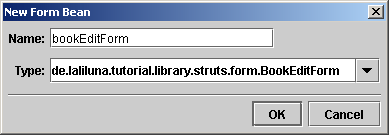
Create a new action mapping. As parameter specify do. This parameter is needed by the DispatchAction.
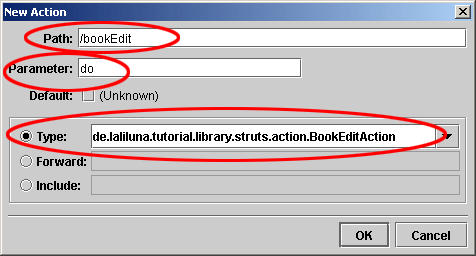
Change theAction.
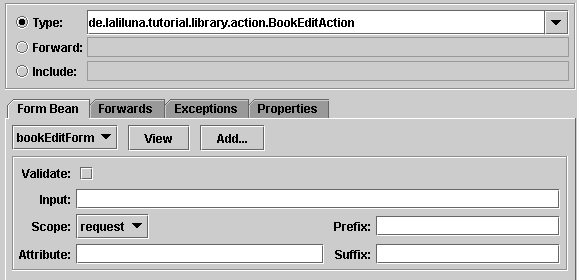
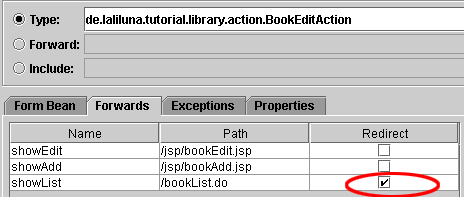
Create three forwards in the ?forward tab?. One for the JSP to edit, one for the JSP to add and one which forwards to the book list.
The lost forward does not forward to a JSP but to another action.
Create a JSP bookAdd.jsp in the directory /WebRoot/jsp. The forward showAdd forwards to this page.
Change the source code of the JSP
Open the file bookAdd.jsp and add the following source code.
<%@ page language="java"%>
<%@ taglib uri="http://jakarta.apache.org/struts/tags-bean" prefix="bean"%>
<%@ taglib uri="http://jakarta.apache.org/struts/tags-html" prefix="html"%>
<%@ taglib uri="http://jakarta.apache.org/struts/tags-logic" prefix="logic" %>

<html>
 <head>
 <title>Add a book</title>
 </head>
 <body>
 <%-- create a html form --%>
 <html:form action="bookEdit">
 <%-- print out the form data --%>
 <table border="1">
 <tr>
 <td>Author:</td>
 <td><html:text property="author" /></td>
 </tr>
 <tr>
 <td>Title:</td>
 <td><html:text property="title" /></td>
 </tr>
 <tr>
 <td>Available:</td>
 <td><html:checkbox property="available" /></td>
 </tr>
 <tr>
 <td colspan="2">
 <html:submit>Save</html:submit>
 </td>
 </tr>
 </table>
 <%-- set the parameter for the dispatch action --%>
 <html:hidden property="do" value="saveBook" />
 </html:form>
 </body>
</html>
The tag <html:form>
creates a new HTML form and refers with the parameter
action=?bookEdit? to
the action mapping. The Tag <html:text>
creates a text field with the property author of the
book.
<html:hidden>
is a hidden form field with the name do. We need this hidden field,
because it tells the dispatch action class which method will called.
Open the file bookEdit.jsp. You can use the source code of the of the file bookAdd.jsp and change the following lines.
<title>Edit a book</title>
Add the following line above <html:hidden property="do" value="saveBook" />
<%-- hidden field that contains the id of the book --%>
<html:hidden property="id" />
Changes to the book list JSP
Open the file bookList.jsp and change the source code:
<%@ page language="java"%>
<%@ taglib uri="http://jakarta.apache.org/struts/tags-bean" prefix="bean"%>
<%@ taglib uri="http://jakarta.apache.org/struts/tags-html" prefix="html"%>
<%@ taglib uri="http://jakarta.apache.org/struts/tags-logic" prefix="logic"%>
<html>
<head>
<title>Show book list</title>
</head>
<body>
<table border="1">
<tbody>
<%-- set the header --%>
<tr>
<td>Author</td>
<td>Book name</td>
<td>Available</td>
<td> </td>
<td> </td>
</tr>
<%-- check if book exists and display message or iterate over books --%>
<logic:empty name="bookListForm" property="books">
<tr>
<td colspan="5">No books available</td>
</tr>
</logic:empty>
<logic:notEmpty name="bookListForm" property="books">
<logic:iterate name="bookListForm" property="books" id="book">
<tr>
<%-- print out the book informations --%>
<td><bean:write name="book" property="author" /></td>
<td><bean:write name="book" property="title" /></td>
<td><html:checkbox disabled="true" name="book" property="available" />
</td>
<%-- print out the edit and delete link for each book --%>
<td><html:link action="bookEdit.do?do=editBook" paramName="book"
paramProperty="id" paramId="id">Edit</html:link></td>
<td><html:link action="bookEdit.do?do=deleteBook" paramName="book"
paramProperty="id" paramId="id">Delete</html:link></td>
</tr>
</logic:iterate>
</logic:notEmpty>
<%-- print out the add link --%>
<tr>
<td colspan="5"><html:link action="bookEdit.do?do=addBook">Add a new book</html:link>
</td>
</tr>
<%-- end interate --%>
</tbody>
</table>
</body>
</html>
Now, you have finished all the coding and can test your application.
Testen der Anwendung
Start the jboss and deploy the project as package archiv. (We have explained this in the JBOSS IDE Webproject tutorial, mentioned above.)
Call the project in your favorite web browser. http://localhost:8080/LibraryWeb/
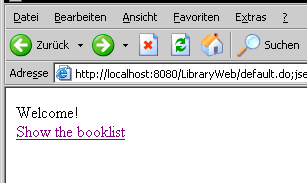
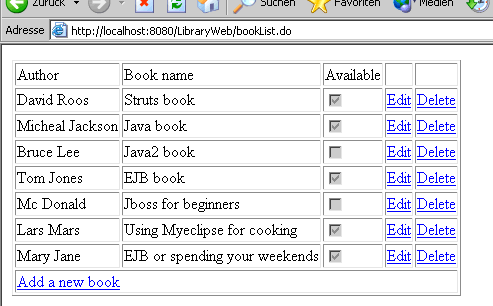
Gratulation, you are close to be a struts expert. ;-)