EJB 2 - Entity EJB with xDoclet, MyEclipse, Jboss and PostgreSql
Creation and testing of a first Entity Bean using Eclipse, MyEcplise, Jboss and xDoclet.
General
Author:
Sebastian Hennebrüder
Date:
Revised
January, 7th 2005
Initial Version
November, 1st 2004
Development Tools
Eclipse 3.x
MyEclipse plugin 3.8
(A cheap and quite powerful Extension to Eclipse to develop Web Applications and EJB (J2EE) Applications. I think that there is a test version availalable at MyEclipse.)
Application Server
Jboss 3.2.5
PDF-Version des Tutorials:
http://www.laliluna.de/download/xdoclet_jboss_first_ejb.pdf
Introduction
If you do not have experinces with development of enterprice java beans with Eclipse, Jboss and xDoclet, this tutorial will help you to start.
Table of Contents
Simple Entity EJB - xDoclet, MyEclipse, Jboss and PostgreSql, MySql 1
General 1
Introduction 1
Create an EJB Module Projects 1
Create an EJB Class 2
Add xDoclet functionality 4
Create Datasource Mapping 6
Edit source code 7
Run xDoclet 8
Run the jboss server 10
Test the Bean 12
Congratulations that it! 13
Create an EJB Module Projects
Create a new EJB Module Project. Right click on the package explorer or with shortcut ?Strg + n?.
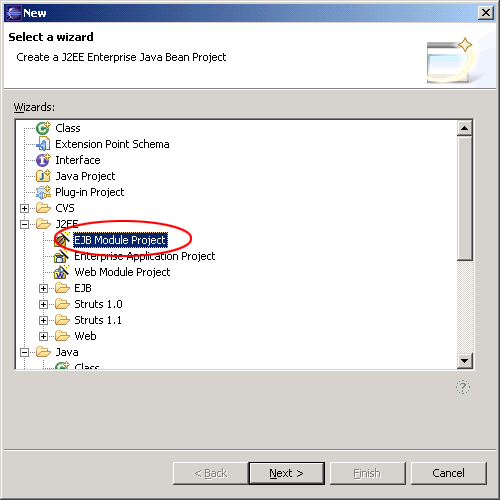
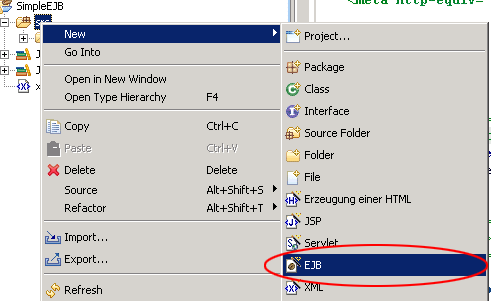
Create an EJB Class
Within the project create a new EJB.
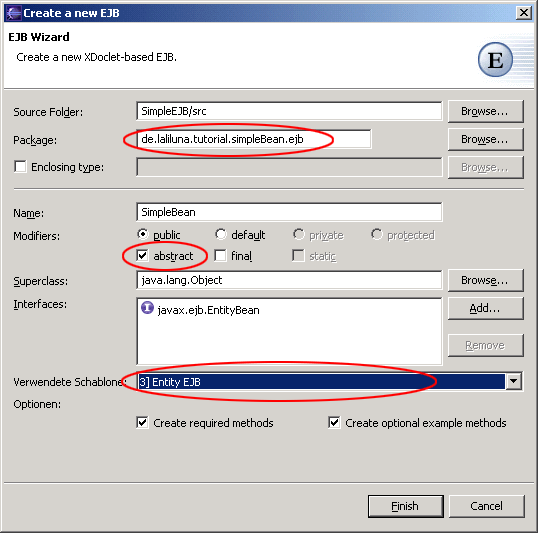
-
Make sure that the package ends with ".ejb" else xDoclet will not work!
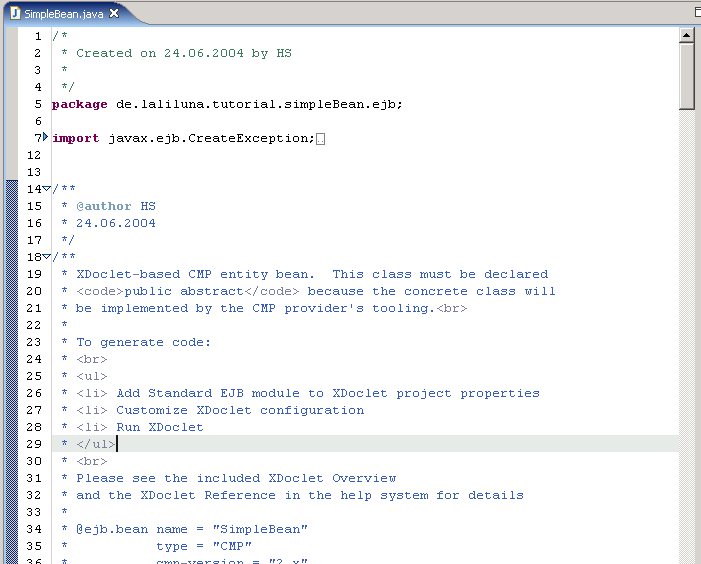
Now you should see the generated source code.
Add xDoclet functionality
-
Open the project properties
-
Choose "MyEclipse-xDoclet"
-
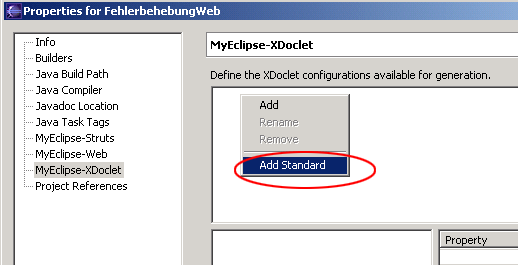
Right click in the right upper window and choose ?Add Standard?.
-
Selet Standard EJB and OK
Click on "Standard EJB" in the right upper window.
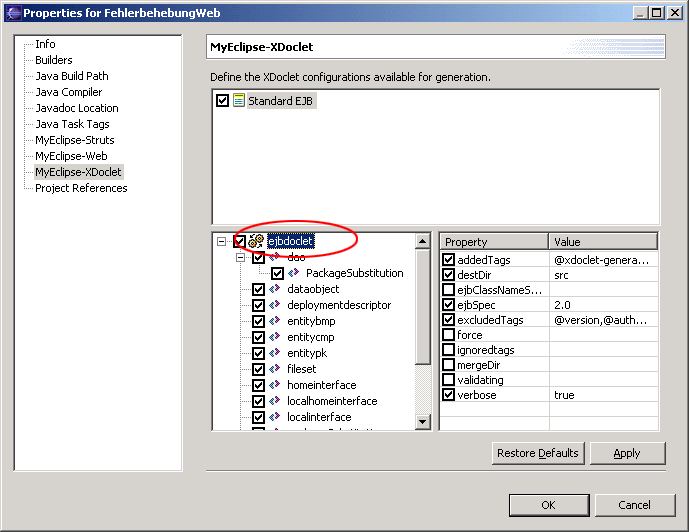
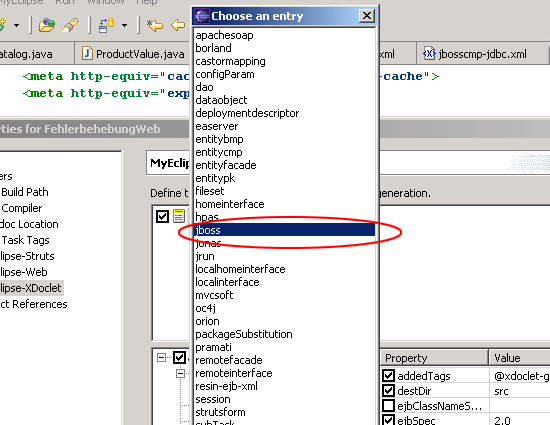
Right click on ejbdoclet and choose jboss from the list.
The following settings must be add.
-
Jboss Version, it is 3.2 for all 3.2.x
-
the destDir (where the the jboss.xml and jbosscmp-jdbc.xml will create)
-
You need a datasource, we will prepare this later. Take a name here like "java:/tutorialDS"
-
Datasource Mapping. Tells the Application Server what kind of field is used in the DB for a jdbc-type. Find out the name yourself by looking into
{jboss_home}serverdefaultconfstandardjbosscmp-jdbc.xml.
mysql is mySQL for example. But we are using PostgreSQL!
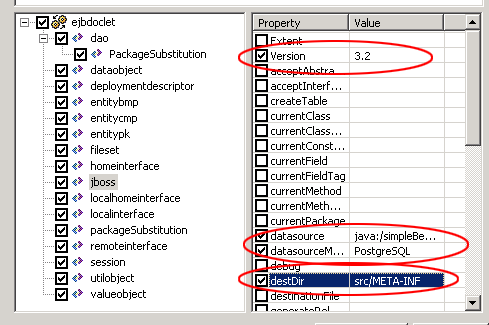
Create Datasource Mapping
-
Copy the driver to (you will find it on http://www.postgresql.org) to
jboss-3.2.4serverdefaultlib -
Create the database in Postgre.
-
Create the tables and two fields fid and fname with type text.
-
You can find examples configuration files for all supported DBs in
jboss-3.2.4docsexamplesjca -
Copy the file postgres-ds.xml to
jboss-3.2.4serverdefaultdeploy
change the content of the file to:

<datasources>
  <local-tx-datasource>
    <jndi-name>MyDS</jndi-name>
    <connection-url>
    jdbc:postgresql://localhost:5432/database-name
    </connection-url>
    <driver-class>org.postgresql.Driver</driver-class>
    <user-name>username</user-name>
    <password>password</password>
  </local-tx-datasource>
</datasources>
Edit source code
Find the following position in the source code.
 * @ejb.bean name = "SimpleBean"
 *           type = "CMP"
 *           cmp-version = "2.x"
 *           display-name = "SimpleBean"
 *           description = "SimpleBean EJB"
 *           view-type = "both"
 *           jndi-name = "ejb/SimpleBeanHome"
 *           local-jndi-name = "ejb/SimpleBeanLocalHome"
 *
 * @ejb:util
 *      generate="physical"
 */
public abstract class SimpleBean implements EntityBean {

Add the following:

 * @ejb.bean name = "SimpleBean"
 *           type = "CMP"
 *           cmp-version = "2.x"
 *           display-name = "SimpleBean"
 *           description = "SimpleBean EJB"
 *           view-type = "both"
 *           jndi-name = "ejb/SimpleBeanHome"
 *           local-jndi-name = "ejb/SimpleBeanLocalHome"
 *      primkey-field = "id"
 * @ejb.persistence table-name = "tsimplebean"
 * @jboss.persistence table-name = "tsimplebean"
 * @ejb:util
 *      generate="physical"

Now we will add the Primary key field id and a second
field name

public abstract class SimpleBean implements EntityBean {

        /** The EntityContext */
        private EntityContext   context;

        /**
         * @ejb.interface-method view-type = "both"
         * @ejb.persistence column-name = "fid"
         * @ejb.pk-field
         *
         * @return
         */
        public abstract String getId();

        /**
         * @ejb.interface-method view-type = "both"
         *
         * @param name
         */
        public abstract void setId(String id);

        /**
         * @ejb.interface-method view-type = "both"
         * @ejb.persistence column-name = "fname"
         *
         * @return
         */
        public abstract String getName();


        /**
         * @ejb.interface-method view-type = "both"
         *
         * @param name
         */
        public abstract void setName(String name);
}
Run xDoclet
We
have not completely finished the source code, but it is time for a
first generation with xdoclet.
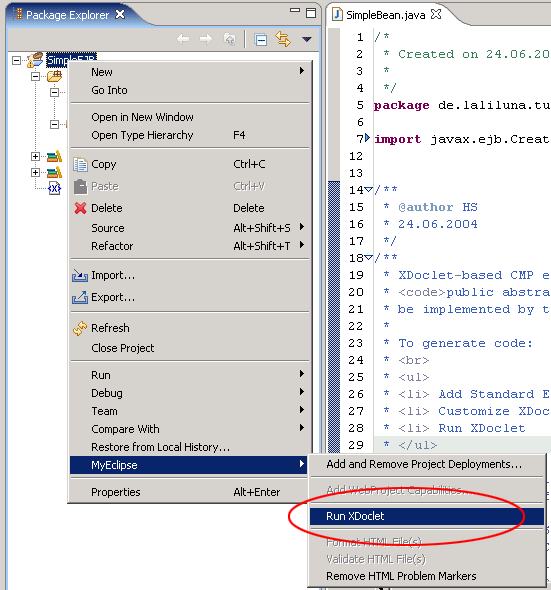
Right click on the project and
choose run xdoclet.
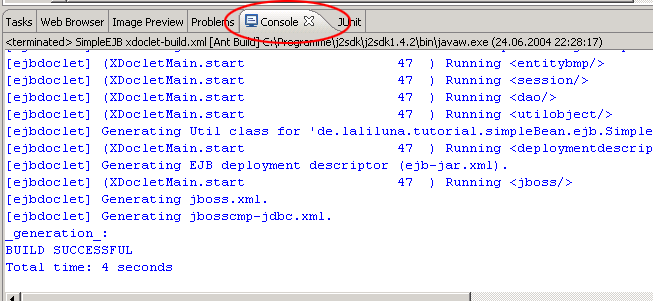
Open the console and look if everything is OK.
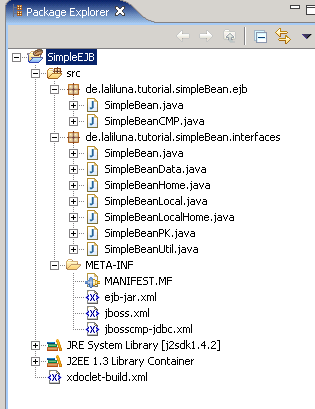
Your package should have an interface package now, with the generated home and local interfaces. You should have a jboss.xml and a jbosscmp-jdbc.xml in src/META-INF.
Have a look
in the file SimpleBeanUtil. You will find some useful functions.
We
will use one to finish our bean. Change the ejbCreate method to the
following:
   * @ejb.create-method
   */
  public String ejbCreate() throws CreateException
  {
    this.setId(SimpleUtil.generateGUID(this));
    return null;
  }

This will generate a random ID. That's it.
Run the jboss server
Start the jboss server and deploy the project.
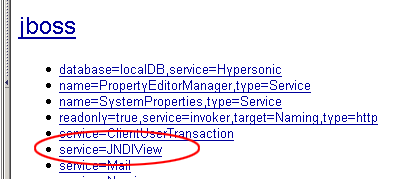
Now open http://localhost:8080/jmx-console in your browser and select service JNDI-View, than select operation ?list?
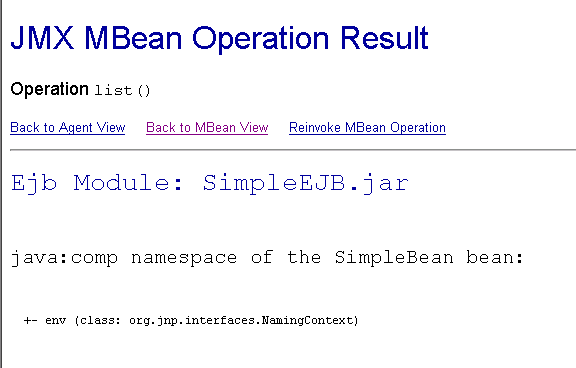
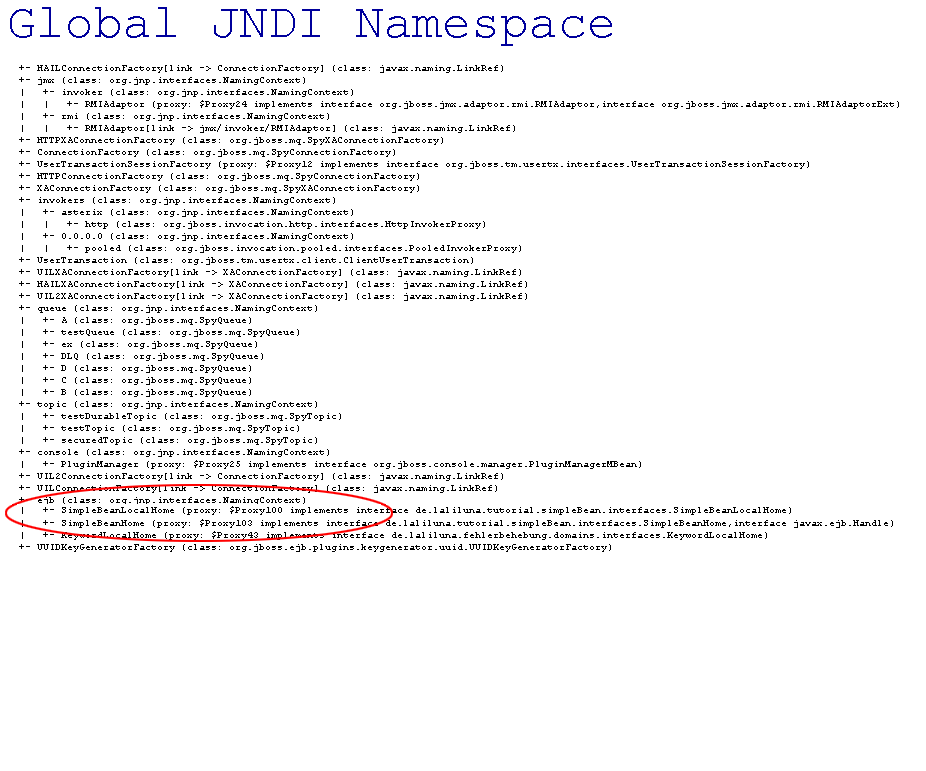
You can see your bean module now and it should also occur in the global JNDI namespace.
Test the Bean
Create a Java project. Open the project properties and add the library j2ee and the jar jbossall-client.
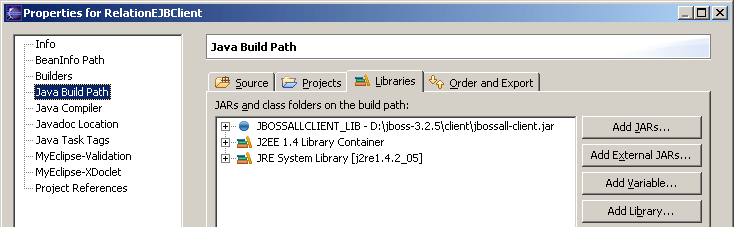
Include your EJB project.
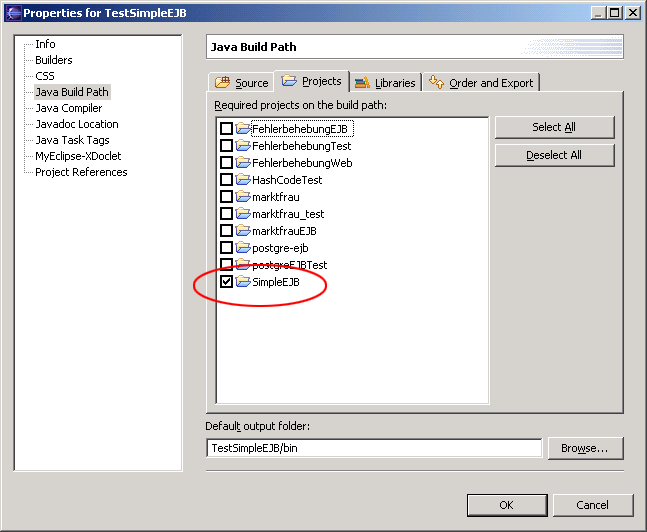
Create a new Class like the following and run it as java application.

package de.laliluna.tutorial.simpleBean;

import java.rmi.RemoteException;
import java.util.Properties;

import javax.ejb.CreateException;
import javax.ejb.EJBException;
import javax.naming.InitialContext;
import javax.naming.NamingException;
import javax.rmi.PortableRemoteObject;

import de.laliluna.tutorial.simpleBean.interfaces.Simple;
import de.laliluna.tutorial.simpleBean.interfaces.SimpleHome;

/**
 * @author HS
 *
 *
 */
public class SimpleBeanClient {

  Properties properties;

  public SimpleBeanClient() {
    properties = new Properties();
    properties.put("java.naming.factory.initial",
        "org.jnp.interfaces.NamingContextFactory");
    properties.put("java.naming.factory.url.pkgs",
        "org.jboss.naming:org.jnp.interfaces");
    properties.put("java.naming.provider.url", "jnp://localhost:1099");
    properties.put("jnp.disableDiscovery", "true");
  }

  public static void main(String[] args) {
    SimpleBeanClient beanClient = new SimpleBeanClient();
    beanClient.createBean();
  }

  public void createBean() throws EJBException {
    try {
      // [laliluna] create a context to look up the beans in the JNDI
      InitialContext context = new InitialContext(properties);
      /*
       * [laliluna]
       * we have to look up the remote interaces as we are not in the same environment as the EJB.
       * Therefore we will have to use the PortableRemote class to convert our object
       */
      Object object = context.lookup(SimpleHome.JNDI_NAME);
      SimpleHome simpleHome = (SimpleHome) PortableRemoteObject.narrow(object,
          SimpleHome.class);

      Simple simple = simpleHome.create();
      simple.setName("Gunter");
      System.out.println(simple.getId());
      System.out.println(simple.getName());

    } catch (NamingException e) {
      throw new EJBException(e);
    } catch (RemoteException e) {
      throw new EJBException(e);
    } catch (CreateException e) {
      throw new EJBException(e);
    }

  }
}